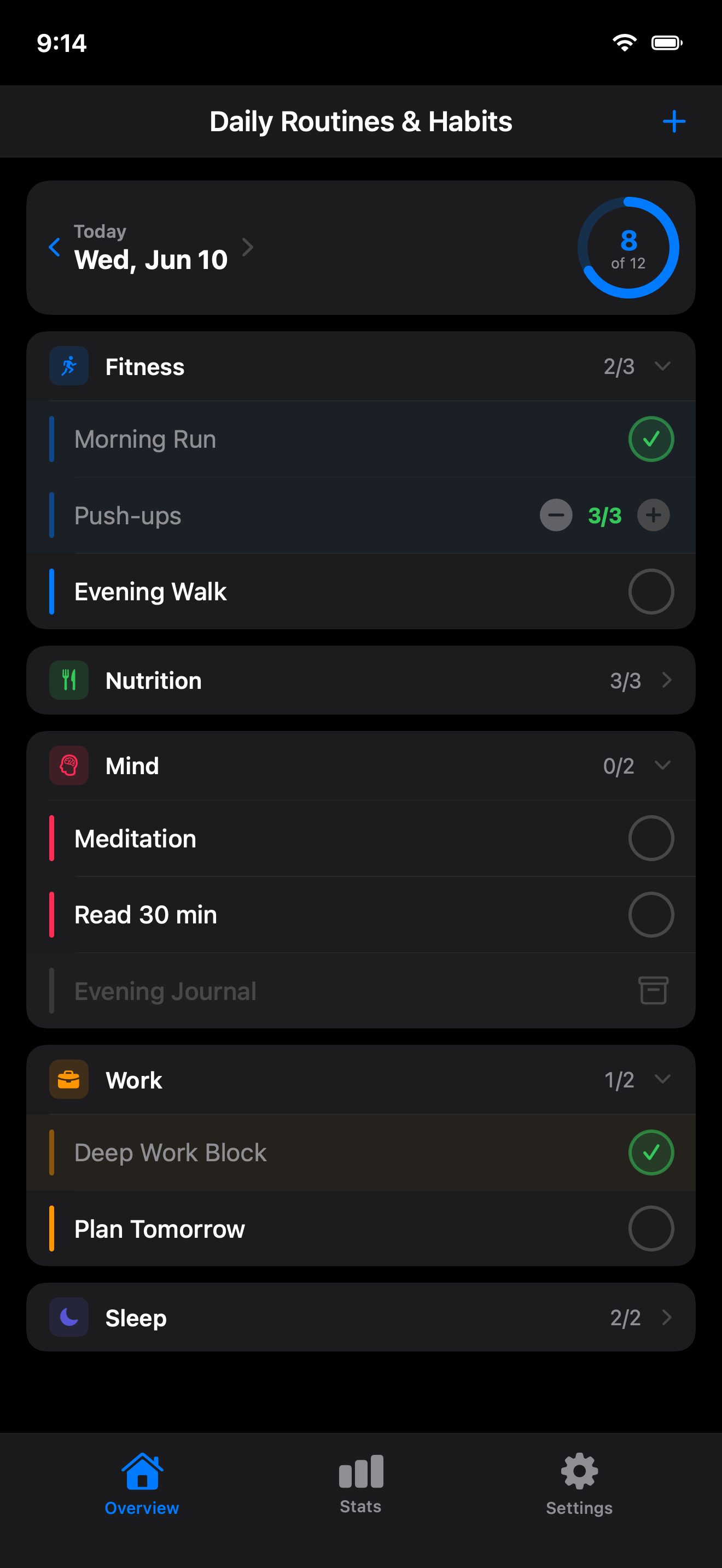
All your routines grouped by area of life. See what is done and what is left, with exercise, work, and rest neatly grouped.
Every routine is clearly incomplete, completed (gently dimmed), or archived (greyed out). No confusion about what needs your attention.
See your progress in a color-coded calendar. Track completed routines and your longest streak over the last 30 days.
Set routines for every day or specific weekdays. Choose morning, afternoon, evening — or repeat throughout the whole day. Set a goal count (e.g. 8 glasses of water) or just track completion.
Remember your morning stretch or a regular glass of water. Choose a time or repeating interval and see the next reminder in the app.
Add a widget in small, medium, or large size — or on your Lock Screen. Tap to toggle a routine without even opening the app. Always shows today's progress and starts fresh every morning.
Your routines and statistics stay in sync between your iPhone and iPad through your private iCloud — automatically, with no account to create and nothing to set up.
Explore the daily overview, statistics, and routine setup.
Daily overview
Completion stats
30-day heatmap
Easy setup
iPad gives your daily overview more room. With the same Apple Account and iCloud enabled, your routines and statistics stay in sync on both devices.
Add your first routine and start today.
Create routines and assign them to areas of life. Set when you want to do them and how often.
Open the app each day and mark routines as complete. Swipe to edit, archive, or delete.
The app tracks your consistency over 30 days with streaks, averages, and a visual heatmap.
Set reminders and add a widget to stay on track without extra effort.
Start with 7 built-in areas or create your own with custom icons and colors.