macOS · Menu Bar Utility

Know exactly how close you are — before you redline.

Limits is a small macOS menu bar app that shows what's left on your Claude (5-hour and weekly windows) and ChatGPT (rate-limit windows) accounts — one click, no browser tab required. The same number is mirrored on the Dock icon too.

macOS 14+ · signed & notarized · free
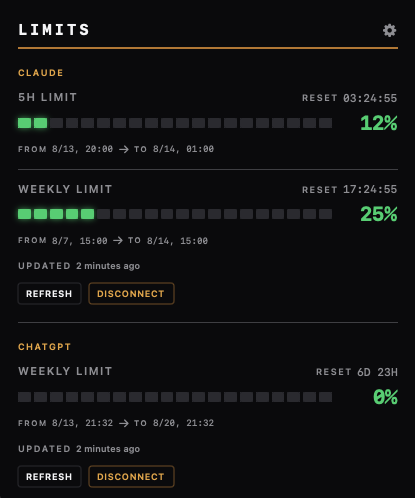
Limits panel showing usage percentages and reset times for Claude and ChatGPT
The Limits panel · example account data
What it does

Four things, done directly — no dashboard to open.

Both providers, one place

Switch between Claude and ChatGPT right in the menu bar — no second browser tab, no tab-switching to check where you stand.

Your own refresh interval

Limits polls on a schedule you set — five minutes by default, adjustable to whatever cadence makes sense for you.

Notified before you hit the wall

A local notification fires as you approach your threshold — no server, no push service, just your Mac telling you.

Built like a cockpit, not a widget

Dark instrument-panel styling with gauges and placards, inspired by endurance-racing telemetry — not another gray menu bar icon.

Under the hood

Limits uses the providers’ internal web endpoints.

So each provider gets its own isolated, logged-in session inside Limits — exactly like a browser tab — and usage is read the same way the provider's own web app reads it, from that session, not from copied cookies. The request runs inside the provider’s signed-in web session.

Fetching from inside claude.ai and chatgpt.com's own logged-in sessions is what makes this work at all — and also what makes it fragile.

These are undocumented, internal endpoints. Anthropic and OpenAI can change them, their auth flow, or their response shape at any time without notice. When that happens, Limits reports it as "data looks different than expected" instead of crashing.
Usage requests
GETclaude.ai/api/organizations/{id}/usage200
GETchatgpt.com/backend-api/wham/usage200
usage data · your signed-in session
 
Privacy

Your account connects directly to the provider.

What it reads
Usage percentages and reset times from your Claude and/or ChatGPT account, using the same logged-in session your browser would use.
What it sends
Usage requests go to Claude and ChatGPT. Sign-in pages also communicate with their authentication services. Limits has no backend of its own and adds no analytics or advertising SDKs.
Where it lives
In WebKit storage managed for Limits, with a separate store for each provider. Limits also saves your app preferences locally.
Deleting your data
Use Disconnect for each provider to clear its stored website data in Limits. Removing the app alone should not be relied on to erase settings and sign-in data.
Read the full privacy policy
Get Limits

Download for macOS

macOS 14 (Sonoma) or later
Signed with Developer ID & notarized by Apple
Free, direct distribution — not on the App Store
Download Limits.zip Release notes & version details

Unzip the download, then move Limits.app to Applications.